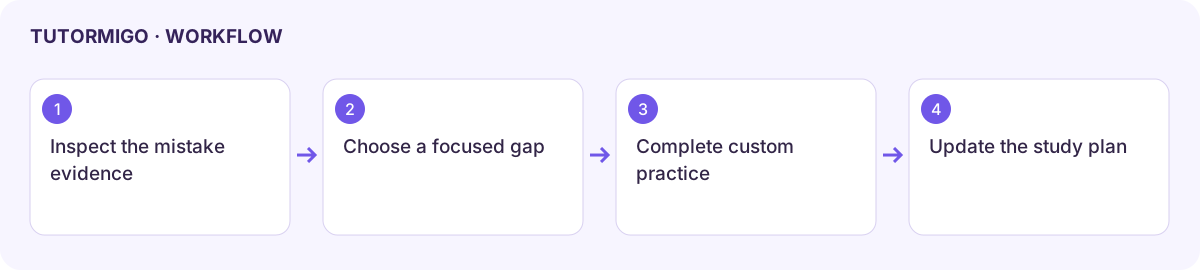
Use mistakes, custom tests, and a study plan
Targeted practice turns your mistakes into short, focused tasks, so you don’t need to retake the whole exam after a low score.
Use the Mistakes tab
Section titled “Use the Mistakes tab”Open your exam and select Mistakes. It collects the questions you got wrong in Learn and Practice, plus any you got right on a Guess, and labels each by error type:
- Lucky guess: you were right, but you guessed.
- Overconfident: you were wrong but marked yourself Sure.
- Careless: a slip, not a gap in knowledge.
- NOT GIVEN vs FALSE and Paraphrase miss: common reading-question traps.
- Concept gap: you don’t yet understand the idea behind the question.
- Filter by error type and compare your answer with the explanation.
- Choose Retry my mistakes to practise them again. You get +15 XP for each one you now get right.
- Choose Make flashcards to turn mistakes into a flashcard deck for this exam. Each mistake is added only once, and the deck holds up to 500 cards.
- Use Show more to load older mistakes.
The mastery chips on the Overview tab show which skills are strong (green), shaky (amber), or weak (red). Select one to open a lesson on it.
Build a custom test
Section titled “Build a custom test”Choose Custom practice on the Practice tab to open the launcher. Pick the mode, length, and section. Set Focus (for example, only my mistakes) and Difficulty. Keep the test short enough that you can review all of it. See Choose Learn, Practice, or Test.
Use the study plan
Section titled “Use the study plan”Your weekly plan lives in the Study Planner. Add a task such as Retry Reading mistakes, 20 min on a specific day, and mark it done when you finish.
A suggestion doesn’t prove a topic is weak, so check the evidence. If the Mistakes tab is empty, complete some Learn or Practice questions first.
Next: Start exam preparation and mock results.
Workflow at a glance
Section titled “Workflow at a glance”